
When considering the purchase of a One Button Studio kit, the first question to ask is; “Where will I put it?”. Here’s a checklist of room requirements to make sure you’re ready for a One Button Studio installation:
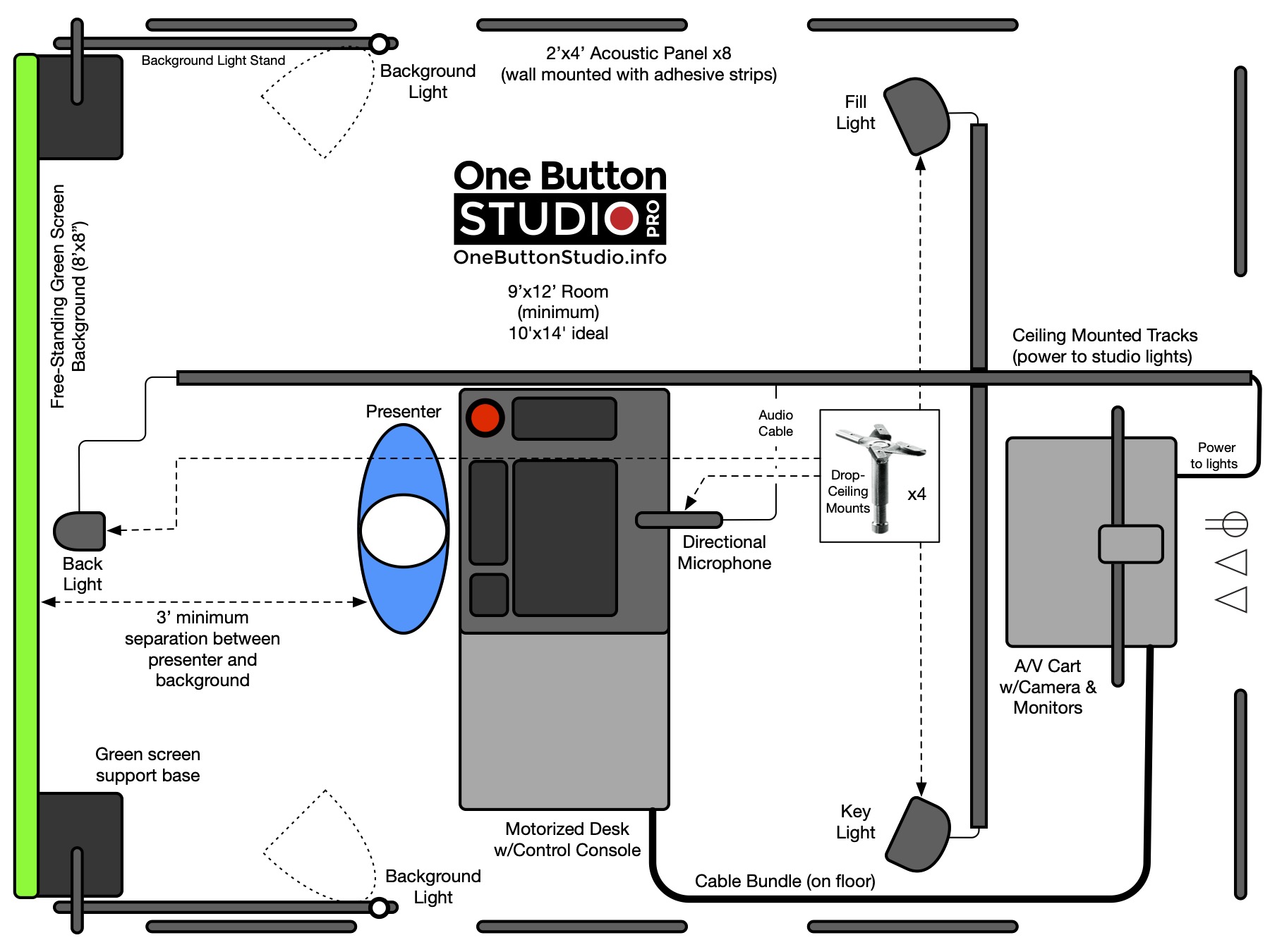
Is my room big enough? A 10′ x 14′ room, with an 8′ 6″-10′ ceiling, is ideal for the One Button Studio Pro. A bare minimum size would be 9′ x 12′. Larger rooms can be used, where a corner, or one side of the room will be dedicated to the One Button Studio. In such a case, a 10′ x 14′ area is ideal. The One Button Studio Go can fit into a smaller space since its footprint is roughly 8′ x 8′.
Do I have a drop-ceiling? Our One Button Studio Pro kits come standard with hardware for hanging the lights, microphone, and power cables from a drop-ceiling grid. The One Button Studio Go is self-contained and does not require mounting anything on the ceiling or walls.
Do I have power? The beauty of these One Button Studios is that everything runs off of two power outlets. Plug the cabinet into the wall, and the desk into the wall and that’s it. No need to bring in the electrician to put power in the ceiling.
Do I need a network connection? The One Button Studio Pro (and Go) are designed to be network connected for uploading recorded videos to your preferred CMS/LMS. Also, having a network connection is necessary for any remote log-in support.
Confer with your IT department when preparing for a One Button Studio purchase, so they can verify that two active network ports are available in the room, prior to the scheduled installation.
Does my room have windows? The struggle with exterior windows is that the lighting conditions can vary dramatically from minute-to-minute. That’s bad news for video recording. Any exterior windows should be covered with blinds, drapes, or blackout window film.
Is my room quiet enough? You’ll want to pick a space that’s relatively quiet. You don’t want noise from adjoining rooms being picked up during video recordings. Is the room next to a bathroom? Can you hear toilets flushing? Not what you want in your recordings! HVAC is another consideration. Do you have a loud air vent in the room? Can you shut it off? The included acoustical panels are designed to reduce the reflection of sound waves inside the room, but they do not act as sound-proofing.
Shipping Considerations
Our One Button Studio kits are delivered via freight––on two pallets. Double check that you have given us the correct shipping address. Please specify if you do not have a loading dock, so we can arrange for lift-gate delivery instead.
Recent Comments